_
On This Page
Introduction
The first instinct when entering the world of bug bounty and web application security is often to start with vulnerabilities.
SQL Injection. Cross-Site Scripting. Broken Access Control. SSRF. Security Misconfigurations.
But there is a more fundamental question that comes before all of them:
What actually happens when you enter a URL into your browser and press Enter?
For someone learning web security, this question is far more important than it may initially appear.
A web vulnerability is ultimately a weakness in how an application handles communication, data, trust, or access. To understand that weakness, we first need to understand the communication itself.
That means understanding the journey from:
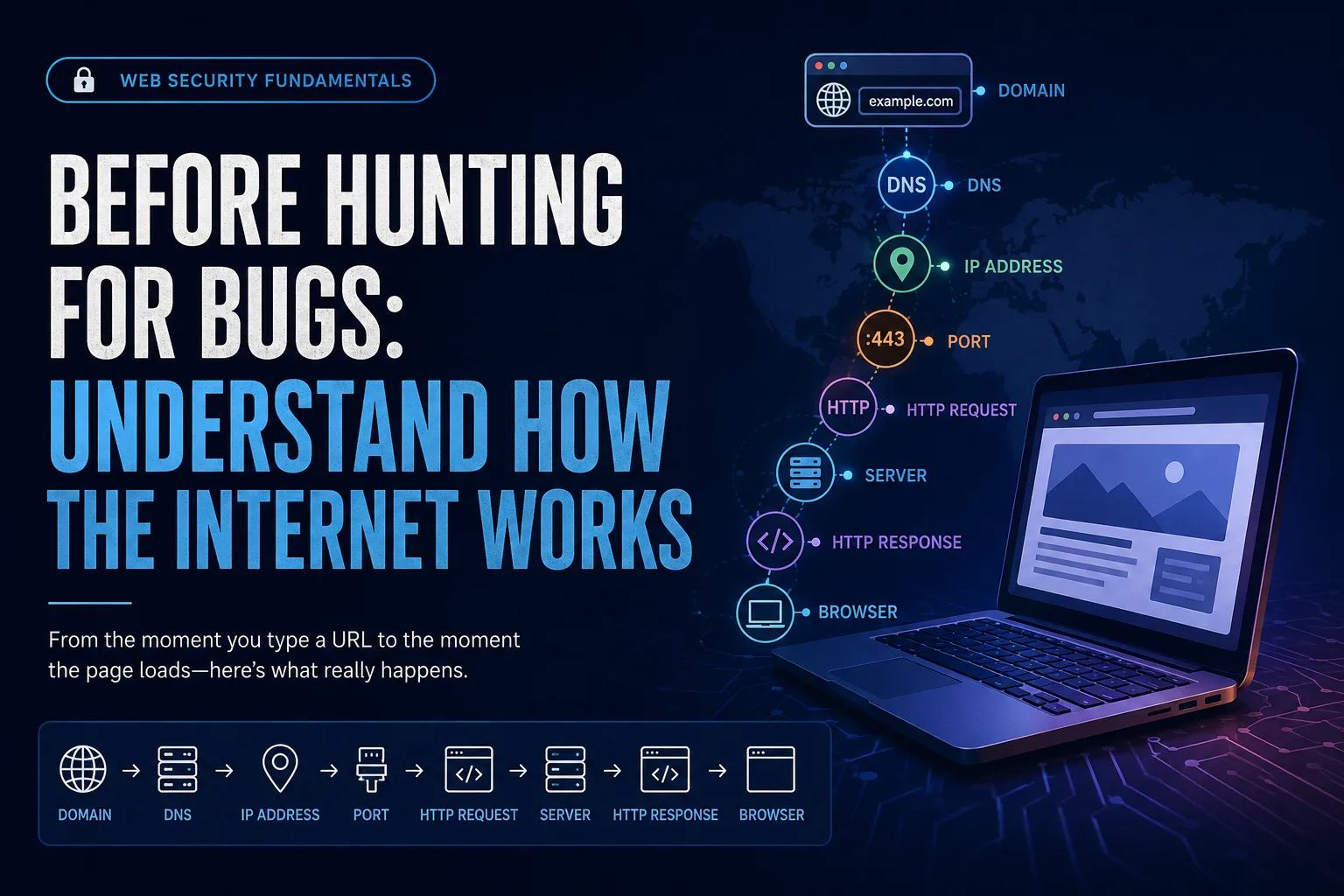
Domain → DNS → IP → Port → HTTP Request → Server → HTTP Response → Browser
This foundation has become an important part of my own learning journey in web application security.
The Internet Starts With Communication
At a basic level, the web operates through communication between a client and a server.
When we open a website, the browser acts as the client. It requests resources from a server, and the server processes that request and sends a response.
But the page we see is rarely just one file.
The browser may receive:
- HTML
- CSS
- JavaScript
- Images
- Fonts
- Videos
- API responses
- Other resources
The browser then processes these resources and constructs the page that we see.
This simple interaction forms the foundation of almost everything we do on the web.
And from a security perspective, every interaction creates another opportunity to ask:
What is being requested? What is being trusted? What is being returned?
How Does a Browser Find a Website?
Suppose we enter:
https://example.com
The browser needs to determine where that domain is hosted.
This is where DNS — the Domain Name System — comes in.
DNS translates a human-readable domain name into an IP address that can be used to reach the destination.
A simplified view is:
example.com
     ↓
    DNS
     ↓
 IP Address
     ↓
Web Server
We can observe this process ourselves using a simple DNS lookup:
dig example.com
This is one of the first practical steps toward understanding the infrastructure behind a web application.
For a security researcher, DNS is not simply a networking concept. Domains and subdomains can form an important part of understanding an application's overall attack surface.
IP Addresses Are Not Enough: Understanding Ports
Once the destination is known, the client still needs to communicate with the appropriate service.
This is where ports are important.
A system can provide multiple network services, and ports help distinguish them.
For example:
80 → HTTP 443 → HTTPS
Ports range from 0 to 65,535.
This distinction becomes particularly important when moving from basic networking into security testing because an IP address alone doesn't describe everything running on a system.
Understanding which service is communicating, through which port, using which protocol provides valuable context.
Then Comes HTTP
Once the browser reaches the appropriate web service, communication happens through HTTP — Hypertext Transfer Protocol.
This is where web security becomes especially interesting.
The browser sends an HTTP request.
The server processes it.
The server returns an HTTP response.
For example:
GET / HTTP/1.1
Host: example.com
User-Agent: Mozilla/5.0
Accept: text/html
At first glance, this may look like ordinary technical information.
But every line has meaning.
The request contains:
Method → What action is being requested?
Path → Which resource is being requested?
Headers → What additional information is being provided?
Body → Is additional data being submitted?
Understanding these components is essential before attempting to manipulate requests during security testing.
HTTP Headers: Information That Should Never Be Ignored
One of the biggest lessons I have taken from practicing web security is the importance of HTTP headers.
Headers allow the client and server to exchange additional information about a request or response.
A request may contain headers such as:
Host:
User-Agent:
Cookie:
Authorization:
Referer:
Content-Type:
Accept:
These can provide context about:
- The requested host
- The client
- Session state
- Authentication
- Content formats
- Request origin or navigation context
For example, a Cookie header may carry session information, while an Authorization header may contain credentials or a token depending on how the application implements authentication.
This is why learning to read HTTP traffic is so important.
A request is not just a request. It is a description of what the client is asking the server to do.
What Does the Server Send Back?
The server responds with an HTTP response.
A simplified response could look like:
HTTP/1.1 200 OK
Content-Type: text/html
Content-Length: 12345
The response contains three important areas:
Status → Headers → Body
The status code provides an immediate indication of how the request was handled.
2xx → Successful
3xx → Redirection
4xx → Client/request-related error
5xx → Server-side error
For a security researcher, these responses can provide valuable clues.
For example, a 403 Forbidden response tells us that access to a resource is being denied.
But an important distinction is:
A 403 response is not automatically a vulnerability.
It is information about the application's behavior.
The next question should be:
Why is access being denied, and how is that access control implemented?
That shift—from simply seeing a response to understanding its meaning—is an important part of security testing.
Security Information Hidden in Response Headers
HTTP response headers can also reveal how an application is configured and what security controls are being applied.
Some examples include:
Set-Cookie
Used by the server to instruct the browser to store cookies.
Cookie attributes such as:
Secure
HttpOnly
SameSite
can influence how those cookies are handled by the browser.
Content-Security-Policy
CSP allows developers to define restrictions on the resources and scripts that browsers are permitted to load or execute.
It can help reduce the impact of certain attacks, including XSS.
But simply finding:
Content-Security-Policy: ...
does not automatically mean the application has strong protection.
The policy itself needs to be understood.
What sources are allowed? What scripts are permitted? Are inline scripts allowed? Are dangerous evaluation mechanisms permitted? What framing restrictions exist?
The configuration determines how effective the control actually is.
X-Frame-Options
This header can restrict whether a page may be embedded in a frame and can help protect against certain clickjacking scenarios.
Modern applications may also use CSP's frame-ancestors directive for framing control.
Access-Control-Allow-Origin
This header is part of CORS and controls which origins may be permitted to access resources in cross-origin contexts.
Again, the presence of the header itself does not prove a vulnerability.
Configuration, context, and actual browser behavior matter.
Seeing the Web Through Burp Suite
This is where theory becomes practical.
While practicing authorized web-security labs, tools such as Burp Suite make this communication visible.
Instead of simply seeing a webpage, we can observe:
Browser
   ↓
HTTP Request
   ↓
Burp Suite
   ↓
Web Server
   ↓
HTTP Response
   ↓
Browser
A request can be intercepted and examined.
We can observe:
- HTTP methods
- Parameters
- Cookies
- Authorization mechanisms
- Headers
- Status codes
- Redirects
- Response content
- Security headers
This changes the way we look at an application.
We are no longer simply interacting with a webpage.
We are observing the communication that makes the webpage work.
From Understanding to Security Testing
This foundation becomes particularly valuable when learning the OWASP Top 10.
Consider authentication.
If we understand HTTP requests, cookies, authorization headers, and responses, authentication vulnerabilities become much easier to reason about.
Consider access control.
If we understand requests, URLs, parameters, status codes, and server responses, we can better understand how an application distinguishes between authorized and unauthorized actions.
Consider XSS.
If we understand how browsers process HTML and JavaScript and how security controls such as CSP work, we can better understand both the vulnerability and its mitigations.
The same principle applies across web security.
The vulnerability is only one part of the story.
We also need to understand:
How the application works. What the browser does. What the server expects. What security controls exist. How those controls are configured.
The Mindset I Am Building
One of the biggest changes in my learning has been moving away from simply asking:
“What payload should I try?”
and starting to ask:
“How does this application work?”
Then:
“What is the expected behavior?”
Then:
“What changes when the request changes?”
And finally:
“Does that difference represent an actual security impact?”
This mindset is more valuable than memorizing a long list of payloads.
Tools can help us observe and test.
But understanding tells us what we are actually looking at.
Final Takeaway
Before hunting for bugs, learn the technology.
Understand how a domain becomes an IP address.
Understand how ports identify services.
Understand how HTTP requests and responses work.
Understand what headers communicate.
Understand cookies, authentication, sessions, and security policies.
Then start looking at applications through tools such as Burp Suite and practice these concepts in authorized environments.
Because effective web security testing is not simply about finding something that looks unusual.
It is about understanding why it happens, whether it violates the application's intended security boundary, and what impact it creates.
Before trying to break the web, learn how the web works.
That is the foundation I am building as I continue my journey into web application security, OWASP, PortSwigger labs, and practical security testing.
This article is intended for educational purposes and practical learning in authorized environments.